
Ultrasonic distance sensor (Sonar:bit)
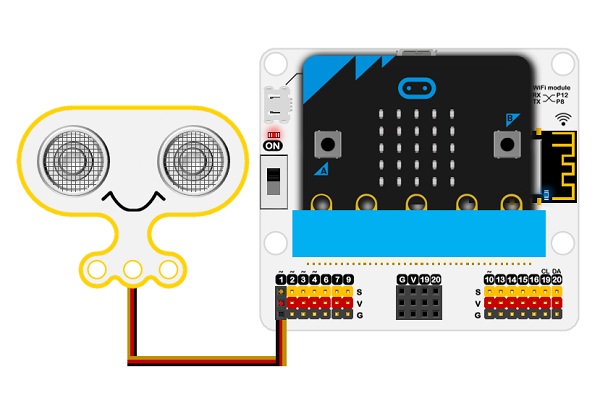
Hardware Assembly: micro:bit, IoT expansion board, Sonar:bit
Ensure that there is NO POWER to the Microbit when assembling or disassembling components.
- Mount the micro:bit: Slot the micro:bit firmly into the edge connector of the IoT expansion board.
- Connect the Sonar:bit: Use the 3-pin GVS (Ground, Voltage, Signal) cable.
- Match the colors:
- Plug the cable into the Sonar:bit. (ensure Black matches G, Red matches V, and Yellow/Signal matches S).
- Connect the other end to the expansion board's Numer 1 port (P1)
Setup the Microbit with Sonar:bit
- Launch Browser: Open Chrome
- Open Editor: Navigate to makecode.microbit.org and click the home button
- Optional: Log in if you have a google or Apple Account
- Create: a new project named "Sonar_Sensor".
- Hardware Pairing: (If not already paired)
- Connect the micro:bit to the Mac via USB.
- Click the ... button next to Download, select Connect device, and pair the browser directly to the micro:bit hardware.
Ultrasonic distance sensor - Create a sensor to display distance to an object
- Delete the default "on start" block. You will use the forever block
- Add IoT extensions: Click Extensions, search for "Sonar", and add the package to reveal custom sensor blocks.
- Initialize variables: Create a variable named distance.
- Read sensor data:
- From Variable, place a set distance to 0 block inside a forever loop,
- From Sonar, drag the code block to replace the 0 in the set distance black
- Make the settings: Ping trig and echo are set to P1. Unit is set to cm.
- Display data: Add a show number block inside the loop to constantly scroll the distance value on the micro:bit screen.
-
Test on the Microbit
- Click the Download button.
- Test the program on the microbit
Ensure that there is NO POWER to the Microbit when assembling or disassembling components.
Microbit for RPSEC Main Page